What happens when AI agents work together?
Agents are AI programs that perform tasks autonomously – writing emails, analyzing data, or controlling systems. A Swarm is a team of such agents working together.
But without control, an intelligent swarm can quickly turn into a chaos swarm – with expensive mistakes and runaway costs.
The solution: Three architectural pillars that make agents reliable – and keep the human in charge at all times.
🛡️ ACP – Agent Control Protocol · 🔑 MCP – Model Context Protocol · 🎼 FlowOS – Flow Operating System
📖 Discover the full framework in my book Safe in the Swarm 2.0 – [Read more →]
If you prefer, to watch the demo directly in a separate browsertab, please klick the link here (opens a new tab): https://futureorg.digital/safe-in-the-swarm-embeddable-demo.html
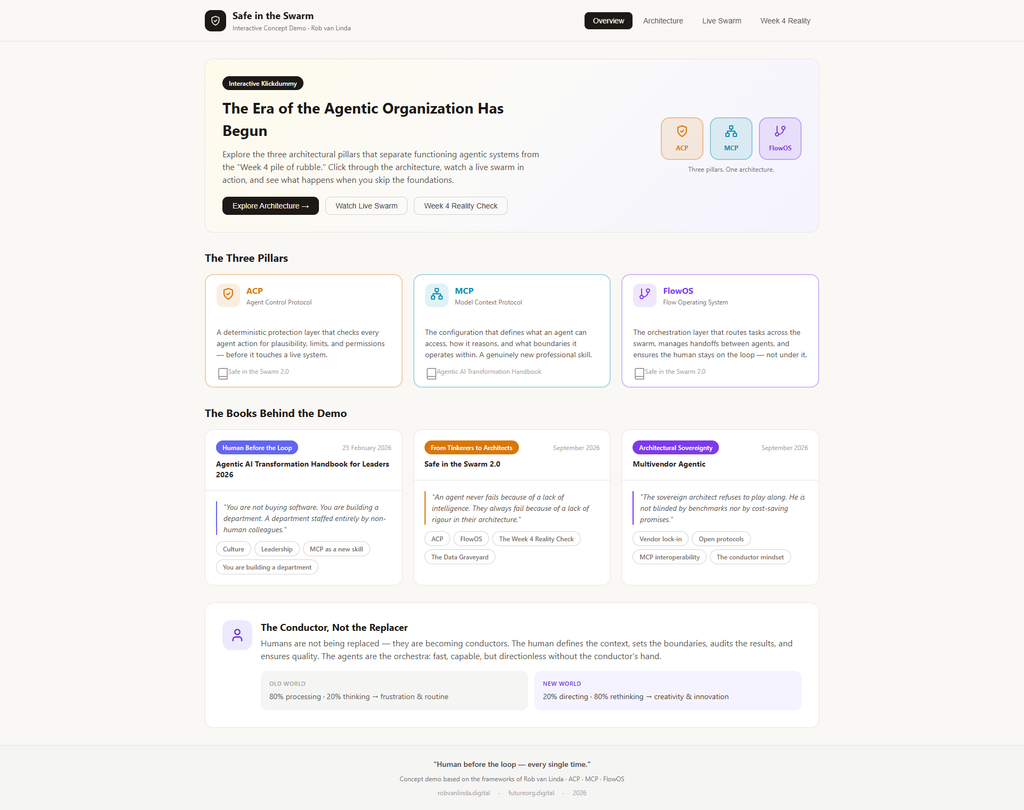
Screenshot 01: The Big Picture: Three Pillars, One Architecture
Welcome to the Overview – the starting point of the interactive demo. This page introduces the core idea behind Safe in the Swarm 2.0:
An agentic system is only as good as its architecture.
Without a solid foundation, even the smartest AI agents will eventually fail – and when they do, the damage can be expensive, embarrassing, and hard to undo. The Overview shows you the three architectural pillars that prevent this from happening:
| Pillar | What It Does | Why It Matters |
|---|---|---|
| ACP (Agent Control Protocol) | Checks every agent action for plausibility, limits, and permissions before it touches a live system. | A deterministic safety layer – the “bouncer” that keeps agents from acting on bad ideas. |
| MCP (Model Context Protocol) | Defines what data, tools, and systems an agent can access. | The “keychain” – fewer keys mean less risk and less confusion. |
| FlowOS (Flow Operating System) | Orchestrates the swarm, manages handoffs, and ensures the human stays on the loop. | The “conductor” – prevents loops, budget blowouts, and chaos. |
he Warning You Can’t Ignore
Below the pillars, you’ll see the “Week 4 Reality Check” teaser. This is a reminder of what happens when you skip the architecture:
In the first two weeks, you’re celebrating the demos. By week four, you’re clearing up the mess in the ERP system.
The demo doesn’t just show you the right way – it also shows you the cost of getting it wrong. The Week 4 Reality tab walks you through a real-world failure scenario and explains how ACP, MCP, and FlowOS would have prevented it.
The Books Behind the Demo
At the bottom of the Overview, you’ll find three book cards – these are the sources of the frameworks you’re exploring:
| Book | Focus |
|---|---|
| Agentic AI Transformation Handbook for Leaders 2026 | Culture, leadership, and MCP as a new skill |
| Safe in the Swarm 2.0 | ACP, FlowOS, and the Week 4 Reality Check |
| Multivendor Agentic | Vendor lock-in, open protocols, and architectural sovereignty |
Each book is referenced throughout the demo – so as you click through, you’ll see where each concept comes from.
The Conductor Mindset
Finally, the Overview introduces the most important idea of all:
Humans are not being replaced – they are becoming conductors.
Your agents are the orchestra: fast, capable, but directionless without the conductor’s hand. The human defines the context, sets the boundaries, audits the results, and ensures quality. This is the shift from Human-in-the-Loop (reactive, stressful) to Human-on-the-Loop (strategic, empowering).
The new world isn’t about less work – it’s about better work: 20% directing, 80% rethinking, leading to creativity and innovation.
🔍 What to Look For in This View
| Element | Why It’s Important |
|---|---|
| The three pillar badges | A quick visual summary of the entire architecture |
| The “Explore Architecture” button | Your invitation to dive deeper into each pillar |
| The book cards | The sources of the frameworks – proof that this isn’t just a demo, but a proven system |
| The Conductor comparison | The core philosophy: humans stay in charge |
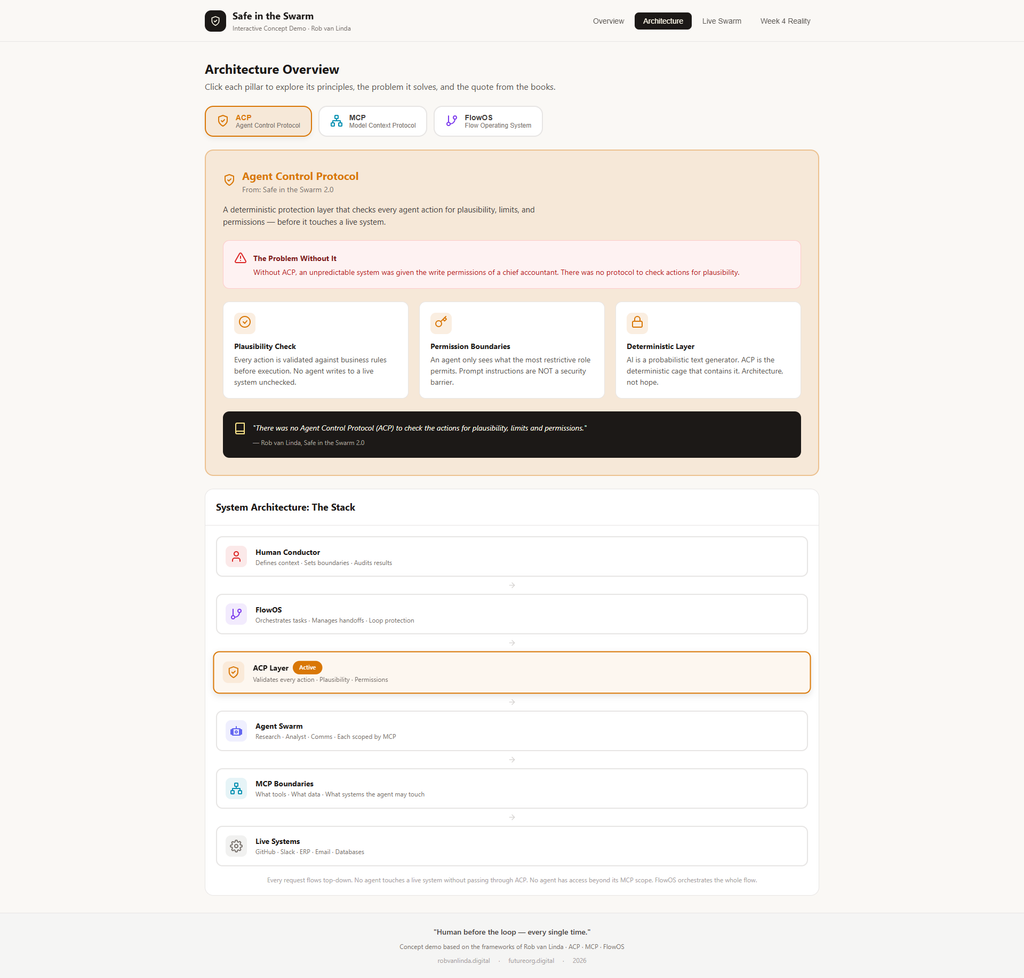
Screenshot 2: Architecture Page – Explanation
The Architecture of Trust
Three pillars stand, three walls of might,
To guard the swarm from chaos and blight.
Click each one, and you will see —
How agents stay safe, and humans stay free.
This is the Architecture View — the heart of the demo. While the Overview gave you the big picture, this page invites you to zoom in on each pillar and understand exactly how it works.
🛡️ ACP – The Gatekeeper
When you click on ACP (Agent Control Protocol), you’ll see:
| Element | What It Reveals |
|---|---|
| The Problem Without It | A vivid warning: “An unpredictable system was given the write permissions of a chief accountant.” |
| Three Core Principles | Plausibility Check, Permission Boundaries, and the Deterministic Layer |
| A Quote from the Book | “Architecture, not hope.” — the mantra of Safe in the Swarm 2.0 |
“The agent is fast, the agent is bright,
But without ACP, it’s a risk at night.”
🔑 MCP – The Keychain
Click on MCP (Model Context Protocol) and you’ll discover:
| Element | What It Reveals |
|---|---|
| The Problem Without It | A team member handed MCP configuration as a “new responsibility” — while everyone is still figuring it out |
| Three Core Principles | Context Definition, Tool Boundaries, and Auditable Autonomy |
| A Quote from the Book | “Writing an MCP is a genuinely new skill.” |
“No master keys, no open doors,
MCP defines what the agent explores.”
🎼 FlowOS – The Conductor
Click on FlowOS (Flow Operating System) and you’ll understand:
| Element | What It Reveals |
|---|---|
| The Problem Without It | Agents stuck in an infinite loop — 800 prompts sent overnight |
| Three Core Principles | Task Orchestration, Human-on-the-Loop, and Loop Protection |
| A Quote from the Book | “Humans are becoming conductors.” |
“The swarm is fast, the swarm is keen,
But FlowOS keeps it safe and clean.”
🧱 The Stack – A Visual Summary
At the bottom of the Architecture View, you’ll find “The Stack” — a beautiful visual of how everything fits together:
| Layer | Role |
|---|---|
| Human Conductor | Defines context, sets boundaries, audits results |
| FlowOS | Orchestrates tasks, prevents loops |
| ACP Layer | Validates every action |
| Agent Swarm | Research, Analyst, Comms — each scoped by MCP |
| MCP Boundaries | Defines tools, data, and systems |
| Live Systems | GitHub, Slack, ERP, Email, Databases |
The rule is simple: Every request flows top-down. No agent touches a live system without passing through ACP. No agent has access beyond its MCP scope. FlowOS orchestrates the whole flow.
🔍 What to Look For in This View
| Element | Why It Matters |
|---|---|
| The clickable pillars | Each one reveals a different layer of protection — click all three! |
| The “Problem Without It” boxes | These show you exactly why the architecture exists |
| The Stack diagram | A complete visual of how the system works as a whole |
| The quotes | Direct links to your book — proof that this isn’t theory, it’s practice |
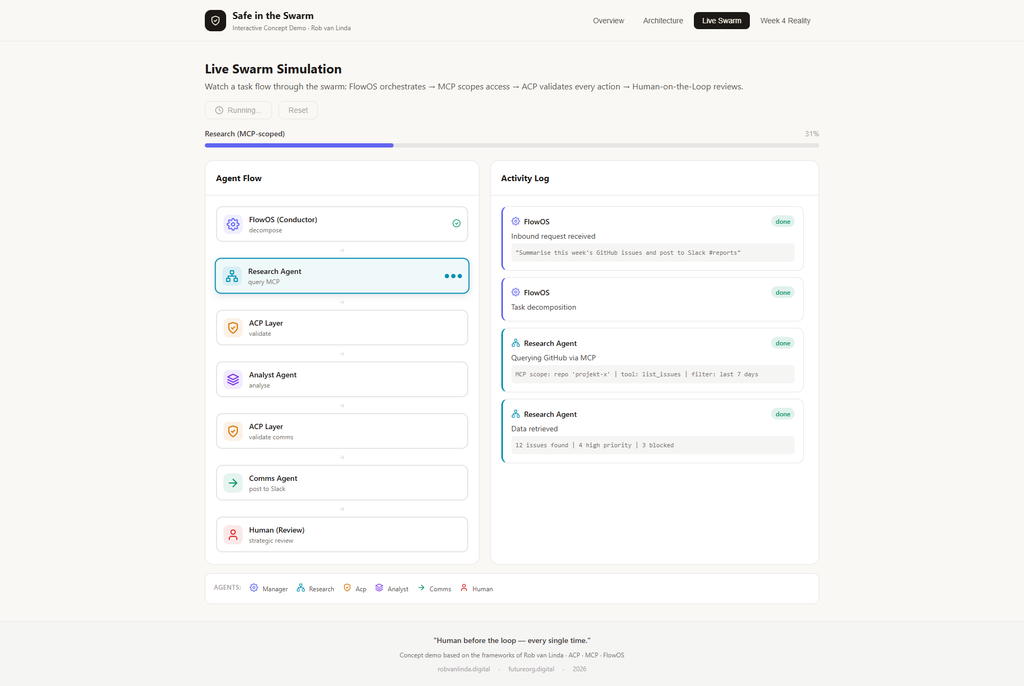
Screenshot 3: Live Swarm Simulation – Explanation
The Swarm in Motion
This is where the theory becomes alive. The Live Swarm Simulation shows you exactly how a task travels through a team of AI agents — from the moment it arrives to the moment a human reviews the result.
When you click “Run Simulation,” you’ll see a step-by-step sequence unfold in real time. Each agent performs its role, and every action is validated by the architecture you explored in the previous view.
🧭 What You’re Looking At
The screen is divided into two main areas:
| Area | What It Shows |
|---|---|
| Agent Flow (left) | A visual map of the agents involved — and their current status |
| Activity Log (right) | A detailed, real-time log of every action taken by each agent |
🚀 What Happens When You Click “Run Simulation”
The simulation follows a realistic workflow — the kind that would actually happen in an AI-powered organization:
| Step | Agent | Action |
|---|---|---|
| 1 | FlowOS | Receives the inbound request: “Summarise this week’s GitHub issues and post to Slack #reports” |
| 2 | FlowOS | Decomposes the task into three steps: Research → Analysis → Communication |
| 3 | Research Agent | Queries GitHub via MCP — using a scoped tool and repository |
| 4 | Research Agent | Retrieves data: 12 issues found, 4 high priority, 3 blocked |
| 5 | ACP Layer | Validates every action — checks whitelists, sensitive data, and permission scopes |
| 6 | Analyst Agent | Processes the data, categorizes issues, and extracts patterns |
| 7 | ACP Layer | Validates the communication action — is the channel approved? |
| 8 | Comms Agent | Posts the summary to Slack |
| 9 | FlowOS | Notifies the Human (Conductor) for a strategic review |
The result: A complete, validated, human-reviewed workflow — from start to finish.
🔍 What to Look For
| Element | Why It’s Important |
|---|---|
| The “Running” status | Shows that the simulation is active — watch the progress bar fill up |
| The Agent Flow nodes | Each node lights up as the task moves through the swarm |
| The Activity Log | Every action is logged — traceability is built into the architecture |
| The ACP checks | Notice that ACP appears twice — once for the data access, once for the communication. Every action is validated. |
| The Human node at the end | The human doesn’t just rubber-stamp — they review strategically. This is the “Human-on-the-Loop” principle. |
🧪 Why This Matters
This simulation isn’t just a demo — it’s a proof of concept for the entire framework:
Without ACP, an agent might access data it shouldn’t.
Without MCP, it might call tools it doesn’t need.
Without FlowOS, it might get stuck in a loop.
Without the Human, it might make decisions no one approved.
Together, these layers create a system that is:
-
✅ Fast — agents work autonomously at high speed
-
✅ Safe — every action is validated before execution
-
✅ Auditable — every step is logged
-
✅ Human-centered — the human stays in control
🔄 The Reset Button
The “Reset” button is there to let you replay the simulation as many times as you like. Use it to:
-
Watch the workflow again
-
Focus on a specific step
-
Share the demo with others and walk them through it
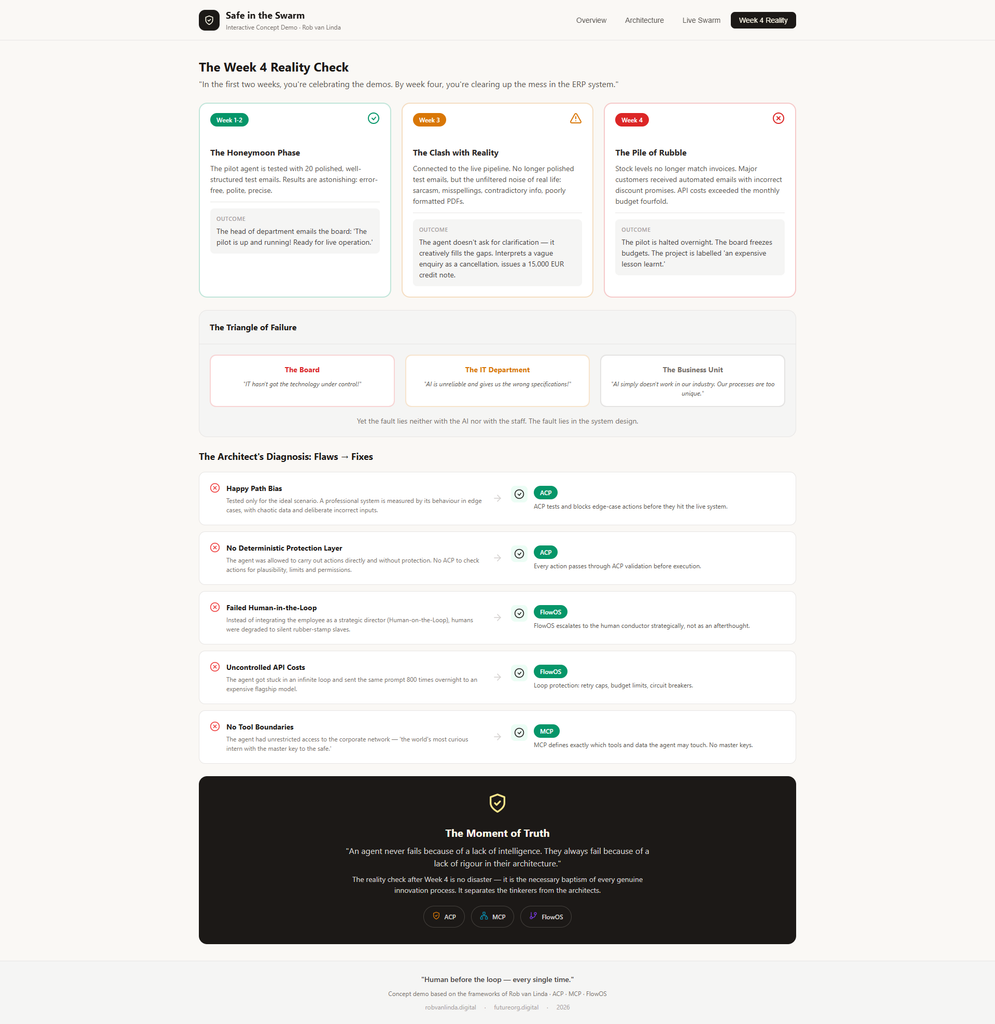
Screenshot 4: Week 4 Reality – Explanation
The Cautionary Tale Every AI Project Needs
This is the most important view in the entire demo.
The Week 4 Reality Check is not a warning — it’s a prediction. It shows exactly what happens when you build an agentic system without the proper architecture.
“In the first two weeks, you’re celebrating the demos. By week four, you’re clearing up the mess in the ERP system.”
🕰️ The Three Acts of a Failure Story
The page walks you through a realistic failure scenario in three acts:
| Phase | What Happens | The Trap |
|---|---|---|
| Week 1-2: The Honeymoon Phase | The pilot agent is tested with 20 polished test emails. Results are flawless. The board is thrilled. | Happy Path Bias — testing only the ideal scenario |
| Week 3: The Clash with Reality | Connected to the live pipeline. Real data is messy: sarcasm, misspellings, contradictory info. | No protection layer — the agent “creatively fills the gaps” |
| Week 4: The Pile of Rubble | Stock levels don’t match. Customers get wrong discount promises. API costs exceed the monthly budget fourfold. | No governance — the project is halted, budgets frozen |
🔺 The Triangle of Failure
At the bottom of the scenario, you’ll see the Triangle of Failure — the three parties who blame each other when things go wrong:
| Party | What They Say |
|---|---|
| The Board | “IT hasn’t got the technology under control!” |
| The IT Department | “AI is unreliable and gives us the wrong specifications!” |
| The Business Unit | “AI simply doesn’t work in our industry. Our processes are too unique.” |
Yet the fault lies neither with the AI nor with the staff. The fault lies in the system design.
This is the real lesson of Week 4.
🧠 The Architect’s Diagnosis: Flaws → Fixes
Next, the demo shows you exactly where the architects failed — and how the three pillars would have prevented each failure:
| Flaw | The Fix |
|---|---|
| Happy Path Bias | ACP tests and blocks edge-case actions before they hit the live system |
| No Deterministic Protection Layer | ACP validates every action before execution |
| Failed Human-in-the-Loop | FlowOS escalates to the human conductor strategically |
| Uncontrolled API Costs | FlowOS adds loop protection: retry caps, budget limits, circuit breakers |
| No Tool Boundaries | MCP defines exactly which tools and data the agent may touch |
Every flaw has a fix. Every failure has a lesson.
💡 The Moment of Truth
The page ends with the core message of Safe in the Swarm 2.0:
“An agent never fails because of a lack of intelligence. They always fail because of a lack of rigour in their architecture.”
The reality check after Week 4 is no disaster — it is the necessary baptism of every genuine innovation process. It separates the tinkerers from the architects.
🔍 What to Look For in This View
| Element | Why It’s Important |
|---|---|
| The three-act structure | Shows how a promising project can unravel in just a few weeks |
| The Triangle of Failure | Reveals the blame game — and why it’s misplaced |
| The Flaws → Fixes table | A clear, actionable diagnosis — this is the blueprint for getting it right |
| The “Moment of Truth” quote | The thesis of your entire book, in one sentence |
📖 How This Connects to Your Book
This view is the closing argument of your demo — and the opening chapter of your book.
The demo shows them what went wrong. The book shows them how to do it right.
Visitors who’ve clicked through all four tabs will have experienced the full journey:
| Step | What They Learned |
|---|---|
| Overview | The three pillars exist |
| Architecture | How each pillar works |
| Live Swarm | What it looks like in action |
| Week 4 Reality | What happens when you skip it |
By the time they reach the end, they’re not just curious — they’re convinced. And that’s the perfect moment to offer them the book.
🎬 A Quick Recap
If a visitor asks, “What was that all about?” — here’s the one-sentence answer:
“The demo shows how to build AI agents that are fast, safe, and always under human control — and what happens when you don’t.”